To add new features and functionality to the 4600A Series Transmille, we have included the ability for the 4600A Series to be updated via USB. This includes new functions as well as replacing/updating specification display files and connection prompts.
Unless noted, this will not affect the calibration validity of the unit.
When prompted to perform an update, load the calibrator.exe file onto a blank memory stick formatted as FAT32. Instructions for this here - 4000 Series : Formatting a Memory Stick to FAT32 Format
Connect the USB stick to the front panel of the 4600A Series and wait for any lights/indicators to indicate that the memory stick has been found, or wait approximately 5 seconds.
Press the 'Main Menu' key, and then press the 'USB Update' button in the top right
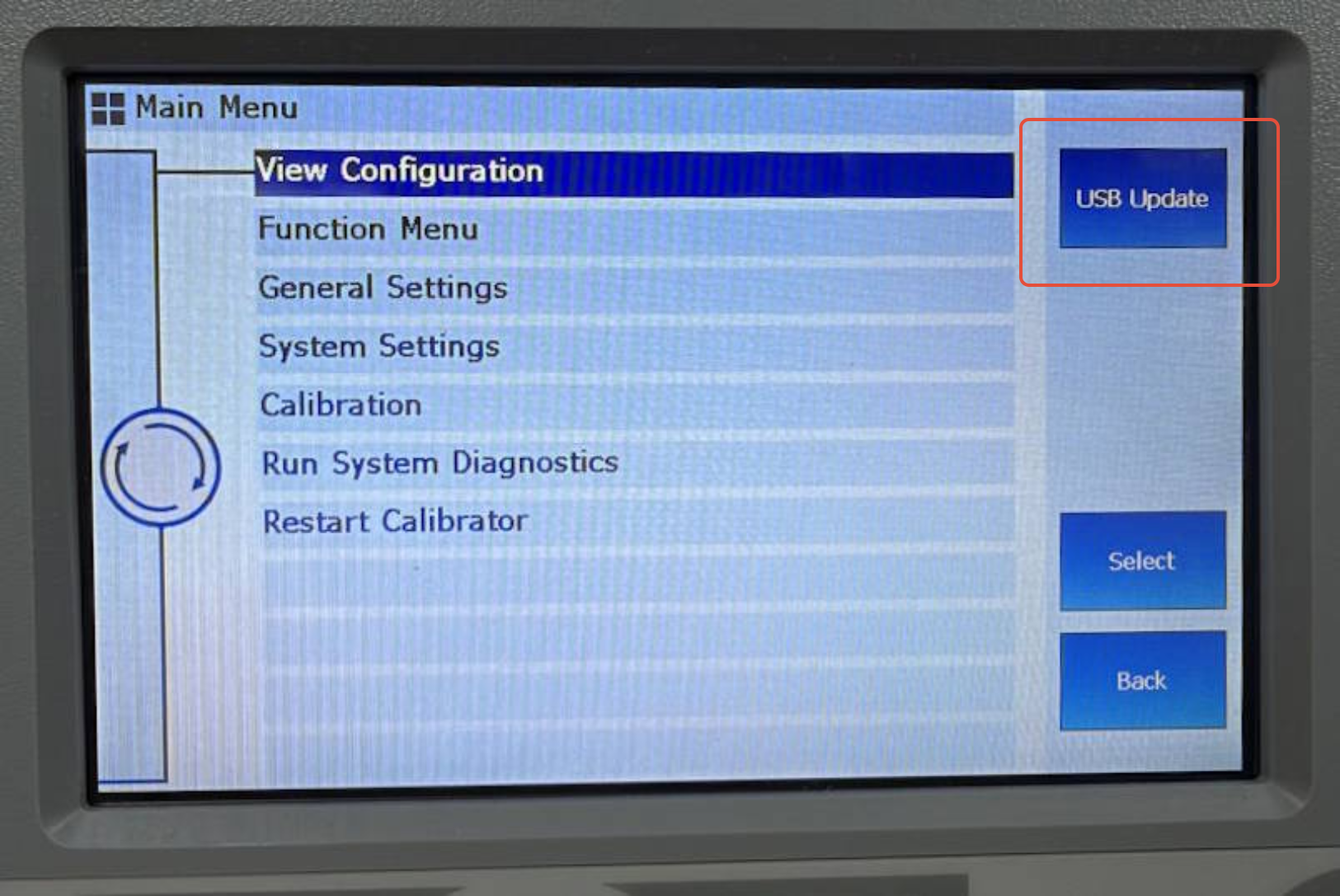
A prompt will appear indicating that the update file is being copied across.
On a successful update, a message will display indicating that the update was successful, and will ask you to remove the USB drive. The Unit will automatically restart after performingt he update
If the Update is not performed successfully please contact Transmille for further assistance.
Was this article helpful?
That’s Great!
Thank you for your feedback
Sorry! We couldn't be helpful
Thank you for your feedback
Feedback sent
We appreciate your effort and will try to fix the article