To test that your Portal Email Settings are correct:
- Launch ProWeb and navigate to the "Email Settings (Portal) tab"
- Check email configuration
- Click "Test Email Configuration"
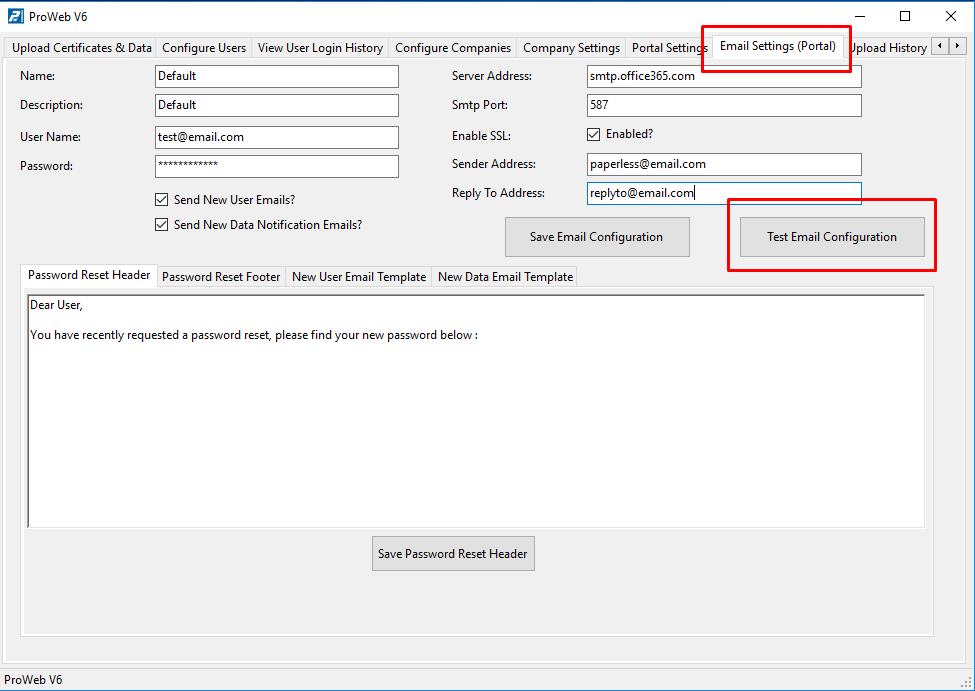
- Two emails should be received. If they are, the test is successful
- If one or no emails are received, or an error message appears, there is a config issue
- Attempt to resolve by checking settings, or create a support ticket for assistance from Transmille
Was this article helpful?
That’s Great!
Thank you for your feedback
Sorry! We couldn't be helpful
Thank you for your feedback
Feedback sent
We appreciate your effort and will try to fix the article